
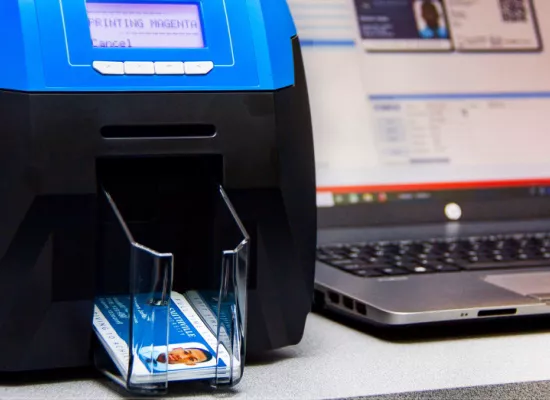
Most Australian schools do not need the fastest ID card printer available. They need one that clears the January intake without a queue forming at the front office, and that is still running reliably in five years.
This guide is for school business managers, IT coordinators and administration staff selecting a card printer for a primary school, secondary school, TAFE or university. It covers how to size a printer against enrolment rather than headline speed, when dual-sided printing is worth specifying, how to match card encoding to the readers already installed on site, and which models in the PPC ID Series suit which kind of school.
PPC has supplied card issuance systems to more than 500 Australian education institutions, including UNSW, TAFE NSW, TAFE Queensland, Brisbane Grammar and the University of Newcastle. The recommendations below reflect what those environments actually run.
What schools actually print
The printer has to suit the whole workload, not just the student card. In most schools that workload includes:
- Student ID cards, issued in bulk at the start of the year and on demand for new enrolments and replacements
- Staff photo ID and lanyard cards
- Visitor, contractor and casual relief teacher badges
- Library, canteen and print release credentials, often on the same card as the student ID
- Excursion, camp and event cards where a temporary credential is needed
Listing this out first matters, because a printer chosen only against student card volume will often turn out to be the wrong specification once name badges and visitor passes are added to it. Our guide to ID card printer requirements sets out the full specification process if you are preparing a tender or a procurement submission.
Size the printer against your January intake, not your annual volume
Annual card volume is the number most schools quote first, and it is the least useful one. Card production in an Australian school is not evenly distributed across the year. It is concentrated into the first two weeks of Term 1.
Work it out in this order:
- New enrolments entering at the start of the year, which is your peak batch
- Replacement cards across the existing cohort, typically 8 to 12 per cent annually in a secondary school
- Staff and contractor cards, usually reissued on a slower cycle
- Mid-year enrolments and one-off reprints, which are on-demand rather than batch
A 900-student secondary school taking 150 new Year 7 enrolments, replacing around 10 per cent of existing cards and issuing to 90 staff produces roughly 330 cards a year. But 150 of those land inside a fortnight, and often inside a single day if the school photographs and issues during orientation.
That peak is the number to size against. At 200 full-colour cards per hour, a batch of 150 is under an hour of machine time, so raw print speed is rarely the constraint in a single-site school. The real constraints are photo capture, data preparation, operator availability and reprints. Print speed becomes the deciding factor in two situations: multi-campus groups issuing centrally for several sites, and universities and TAFEs running O-Week issuance at volume.
Single-sided or dual-sided
Most school cards carry a photo, name, year level and school logo on the front. The back typically carries a barcode, a roll class or house, conditions of use, or an emergency contact number.
If the back of your card is genuinely blank, or carries only preprinted information identical on every card, a single-sided printer is sufficient and preprinted card stock will handle the static content. If the back carries variable data, you need dual-sided printing.
Manually flipping cards is workable at very low volume. It stops being workable during a January batch, where it doubles handling time and introduces alignment and orientation errors at exactly the point in the year when the office has least capacity to absorb them.
Dual-sided is a configuration decision made at the point of purchase, so specify it up front rather than assuming it can be added later.
Match the encoding to the readers you already have
This is the decision that most often gets made in the wrong order. Schools choose a card technology, then discover it does not talk to the readers already installed on the gates, the photocopiers or the library desk.
Audit the existing reader estate first. That usually means the library system, print management, door access, canteen point of sale, and any attendance terminals. Each of those tells you what the card has to be.
The common options in Australian schools are MIFARE Classic 1K, MIFARE DESFire EV3 and 125kHz proximity cards. DESFire EV3 is the current standard for new deployments where security matters, and MIFARE Classic remains widespread in existing installations. Our introduction to MIFARE cards explains the differences, and Not All MIFARE Cards Are Created Equal covers what to check when specifying card stock.
In many schools the card only needs to present a UID that existing systems can read, rather than storing data on the chip itself. That approach is covered in detail in our article on reading MIFARE UIDs into PaperCut, student databases and library systems.
Two practical rules. Do not pay for an encoder you have no system to read. Equally, do not buy a printer without an encoder if an access control or print release project is already on the school's capital plan for the next 12 months, because retrofitting is more expensive than specifying it once.
Comparing the models for a school
The PPC ID Series covers direct-to-card printing from entry level through to high-volume production. The RTP 9660 is included because many schools issue staff and visitor name badges from the same system.
| Model | Sides | Colour speed | Network | Best suited to |
|---|---|---|---|---|
| PPC ID350 | Single | 200 cards per hour | USB | Small primary schools printing on demand from the front office, where desk space is tight |
| PPC ID1000 | Single | 200 cards per hour | USB | Single-site schools with straightforward single-sided cards and modest annual volume |
| PPC ID3000 | Single or dual | 160 cards per hour | Built-in Ethernet | The default choice for most secondary schools. Network connectivity, dual-sided option, 3-year return-to-base warranty |
| PPC ID4000 | Single or dual | 190 cards per hour | Built-in Ethernet | Multi-campus groups, large independent schools, TAFEs and universities issuing at volume |
| PPC RTP 9660 | Dual | Retransfer, 600 dpi | Built-in Ethernet | Schools printing thick name badges alongside CR80 cards, or printing over contact chips and uneven card surfaces |
Which model suits which school
Small primary school, under 400 students
Card volume is low and issuance is on demand rather than batched. The ID350 or ID1000 is sufficient. Both are single-sided, compact enough for a reception counter, and simple enough for any office staff member to operate without training.
Single-site secondary school, 600 to 1,500 students
The ID3000 is the usual answer. Built-in Ethernet means the printer sits on the network rather than tethered to one machine, which matters when photography happens in one room and printing happens in another. The dual-sided configuration covers barcodes and variable data on the reverse, and the 3-year return-to-base warranty covers the period in which most schools would otherwise be budgeting for a replacement.
Multi-campus group, TAFE or university
The ID4000 handles higher sustained volume and the concentrated demand of O-Week or a multi-site January issuance. Where issuance is centralised across campuses, print speed and network reliability both become genuine constraints rather than specification detail.
Schools printing on smart cards or thick name badges
The RTP 9660 uses retransfer rather than direct-to-card printing. It prints over the edge of the card, handles the surface irregularity of contact chip cards without blemishing, and takes both CR80 cards and 1.3mm name badge stock. If a meaningful share of your output is contactless or contact smart cards, retransfer reduces wastage on expensive card stock.
Staff lanyards and visitor name badges
Schools that already run a card printer for student ID often find the same system covers staff and visitor badging. The RTP 9660 prints PPC's thick double hand-snapped name badges, which are used widely across Australia for their durability and finish, with adhesive magnets and pins available.
Printing badges on demand removes the lead time on outsourced orders, which matters for casual relief teachers, contractors and event volunteers who need a credential the same morning. Full detail is on our name badges page.
Cards, ribbons and consumable supply
The printer is a one-off decision. Consumables are an ongoing one, and they are where a card programme either runs smoothly or does not.
Check three things before you commit to a model. First, ribbon yield, which tells you how many cards each ribbon produces and therefore how often the office has to reorder. Second, whether the supplier holds Australian stock, because an interstate dispatch is a different proposition to an overseas backorder during the first week of Term 1. Third, whether ribbons, PVC cards, MIFARE cards and lanyards all come from the same account, since split supply is a reliable source of administrative overhead.
PPC supplies ribbons, blank PVC cards and MIFARE cards for every model in the range from Australian stock.
Software and student system integration
The printer is only part of the system. Card production software is what connects it to your enrolment data, and it is usually the difference between typing details onto a template and printing a batch straight from your student management system.
PPC's CardEze software integrates with the student management, access control, library and canteen systems most commonly used in Australia, including TASS, OneSchool, Sentral, Synergetic, Gallagher and PaperCut. Confirm compatibility with your specific platform and version before finalising a specification. Our education solutions page covers the integration side in full.
A checklist before you request a quote
- Peak batch size in the first fortnight of Term 1, not just annual volume
- Whether the reverse of the card carries variable data, which decides single or dual sided
- The card technology your existing readers require, confirmed by audit rather than assumption
- Whether the printer needs to sit on the network or beside one workstation
- What else the system has to produce, including staff lanyards and visitor badges
- Which student management system the card data will come from
Getting a recommendation for your school
If you can answer the six points above, PPC can recommend a model and configuration rather than send a price list. Send the detail through and our education team will come back with a specification matched to your enrolment, your existing readers and your student management system.
Call 1300 651 277, email [email protected], or contact us to discuss your requirements. PPC has been supplying Australian organisations since 1986, with offices and service teams in Brisbane, Sydney and Melbourne.
Need help choosing the right ID system?
From card stock to printers to software — we help organisations spec the right solution end to end.
Talk to Us →Approved
Ready to get the right ID solution for your organisation?
Tell us about your requirements and we will map out the simplest path to a solution that works — and supply everything you need to get there.
You might also find this useful
View all articles →
Oversized cards are becoming an increasingly popular choice for organisations that need identification to work efficiently in busy or complex environments. While standard card formats

Credentialing decides who gets where at a sporting event. Get it right and operations stay smooth.
An Article about how all MIFARE cards are not created equal